Internet safety month: Seeing through scams

Author: Lucy Roller
Lucy is a student employee with Technology Services.


June is Internet Safety Month. Congress created Internet Safety Month in 2005 as a direct response to the increasing percentage of young people with access to the web. With the world’s growing reliance on technology, it is crucially important to make sure that you are responsible and safe online. 

One persistent danger of the internet is the threat of scams. According to security.org, as of 2020, Illinois was ranked #19 in the nation for cybercrime. Here are some common scams and how you can avoid them. 

Phishing

Phishing is when someone impersonates someone else to try and trick people out of money or personal information. This may take the form of offers that seem to be good to be true, promising money in exchange for bank information, and impersonating family or friends in desperate situations. Internet scams such as phishing often employ a technique known as social engineering. The National Institute of Standards and Technology defines social engineering as “The act of deceiving an individual into revealing sensitive information, obtaining unauthorized access, or committing fraud by associating with the individual to gain confidence and trust.”  

To avoid social engineering, be extremely cautious with who you believe on the internet. Do not give out personal information to people online, especially financial information. Review any suspicious links carefully before clicking on them. If you think someone is trying to scam you, report them, to prevent them from tricking others.  

Artificial Intelligence

Another tool that scammers often use is generative artificial intelligence. AI now can be used to impersonate the voice or image of familiar people to aid in scams, or create false, harmful images that can be used for blackmail.  

AI engines can hallucinate and output information that ranges from slightly inaccurate to blatantly false. When trying to find information, review your sources carefully before believing them. If something seems odd or suspicious, such as a message from a family member, try to verify it in another way. Double check your information across multiple sources. 

What else can you do?

Avoiding scams is important, but it isn’t everything. Here are some further measures you can take to keep yourself safe on the internet.  

Use strong passwords

Make sure that you’re using complex, unique passwords. Don’t use personal information that is easy to discover in your passwords. Use a password manager to store and remember your passwords. Bitwarden is the university approved password manager, but there are many great options out there.  

Use multifactor authentication

Multifactor authentication requires you to use multiple devices or accounts to verify your identity when you are trying to log into an account. According to the Cybersecurity & Infrastructure Security Agency, “The use of multifactor authentication on your accounts makes you 99% less likely to be hacked.” Enabling multifactor authentication is a quick and easy way to improve your digital security. 

Update software

Updating your software is another simple way to keep yourself safe online. Make sure that all your software is up to date to ensure that the latest safety technology is in place. 

Though June may be Internet Safety Month, being responsible online is important year-round. Tech Services has plenty of resources and guides to help you stay safe. Make sure that you are taking steps to protect yourself on the web. 
Dozens of portals to one: my.illinois for all

For more than 20 years, Engineering has hosted dozens of portals, including my.las, my.oar, and my.techservices that supported key university applications. Across all three University of Illinois campuses, this grew to nearly 70 separate portals, each requiring its own maintenance and support. 

We are about to enter a new phase, together. The Office of the CIO and Engineering IT are partnering to unify those portals under a single destination: my.illinois.edu

This consolidation is a concrete example of Illinois’ Boldly IT at work—specifically Strategy 1.2: Develop a formal collaborative structure for IT

“Unifying these across all units makes the single portal potentially visible to every single user on campus,” said Jim Hurst, Chief Administrative Officer at the Office of the CIO. “Removing the specific unit branding and specific portal-locked applications treats all units as part of one larger ecosystem. There has been a single provider of these apps for many years, but this unifying change visually represents us acting more as one IT unit in a coordinated way.” 

One address, one experience

Faculty, staff, and students will now have one place to go, regardless of which unit they work in or which applications they need. Access is controlled at the user level—you’ll only see what you have rights to, no matter which portal you log into. This will be a unified experience for those using the portals and those managing them. 

“When we have updates…we would only have to apply them to one portal, instead of 70,” said Brad Butler, Associate Director of Application Development, Data Analytics, and Project Management Office at Engineering IT. “We are hoping to provide a more consistent user experience and common destination for accessing our applications. We will no longer have to explain ‘go to a specific portal to submit something’ — they can simply go to one place.” 

Engineering IT has owned and operated the my.___ portals for over two decades. What began as a framework built by Josh Potts in the Electrical and Computer Engineering department grew as developers from across Engineering joined in, each building applications designed for anyone to use. 

“We all have a common goal, to help people do their jobs more efficiently and collaboratively,” said Butler. “We write our applications so that anyone can use them and over time, through word of mouth and personalized service, we grew and evolved to what we are today.” 

More than 100 applications are available through the portals, with 43 currently live at my.illinois.edu and more being added over time. Eight are fully funded by the Provost’s office and approved for all units campuswide—TimeTracker, Vacation/Sick Leave, Chart of Accounts, Inventory, Appointments, Gradapps, Gradrecs, and UGradrecs. 

The transition

The portal itself will remain the same and is not retiring; the domain is what will change. The portal itself will remain the same and is not retiring; the domain is what will change. 

“We won’t move anyone, they can simply choose between the two for now. We will notify all users over time if we decide to shut down an existing portal, but even if we were to do that, we would redirect the old portals to the new my.illinois,” said Butler.

“The idea of consolidating to this one name has been proposed a few times over the years,” said Hurst. “But only now under this new [Boldly IT] strategic plan have both sides embraced that.” 

If you have questions or feedback about the move to my.Illinois, you can visit my.illinois.edu/apptrack and chat with the chatbot or send an email to engrit-apps@illinois.edu.

Which generative AI app should I use?

Author: Maya Mishra
Maya is a student employee with Technology Services.


With the rapid rise of generative AI, it can feel overwhelming to choose the right tool. There are dozens of platforms available, each designed with specific tasks in mind. But it is important to note that not all tools are approved for university use, and not all are appropriate for every type of data. 

This is where the AI apps page can come in to help.  

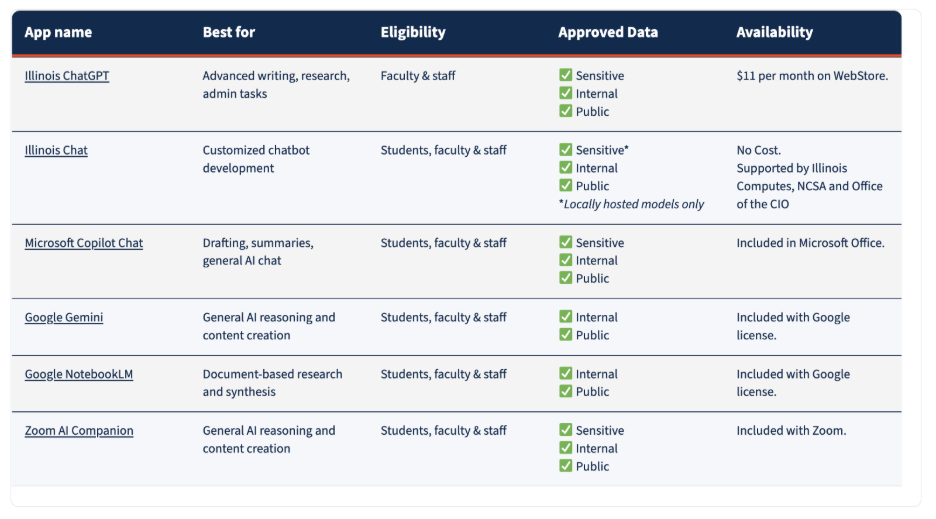
This page provides a list of university-approved AI tools, helping you to quickly understand which applications are best for specific tasks. It also outlines how to access each tool (including any eligible educational licenses), so that you don’t have to waste any time figuring out what is available to you.  

Just as importantly, this page includes a clear and concise guide of approved data that can be used (utilizing Illinois’ data classification guidance), so that you know what information is safe to input in each tool.  The GenAI data handling best practices page also provides important information and guidance about data and AI. 

Whether you’re writing, researching, coding, or just getting familiar with AI, the page is designed to help you use these technologies with confidence! As interest in AI continues to grow, keep an eye out for future events, trainings, and resources from the Office of the CIO to stay informed and make the most of what AI has to offer at Illinois. 

U of I’s new Enterprise IT service catalog

Author: Maya Mishra
Maya is a student employee with Technology Services.


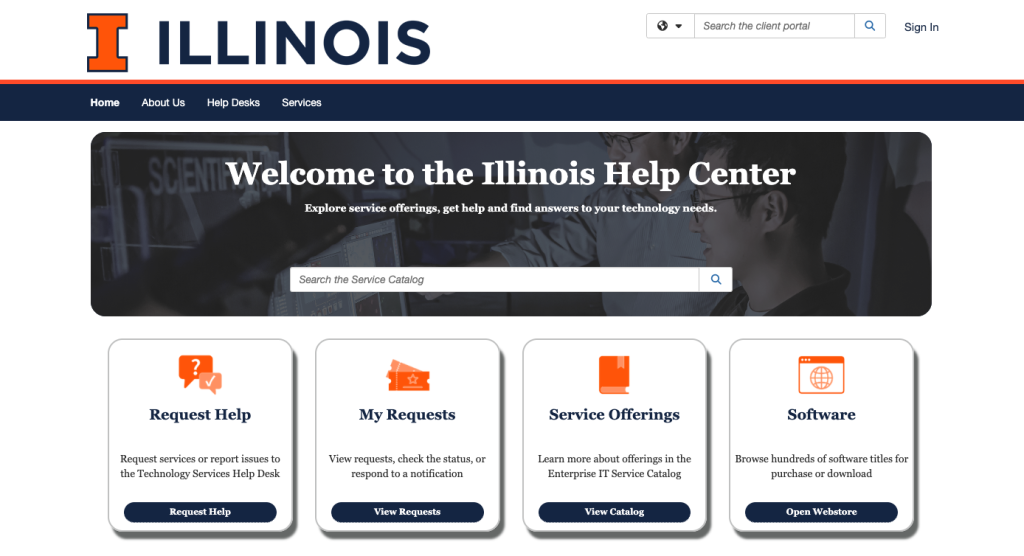
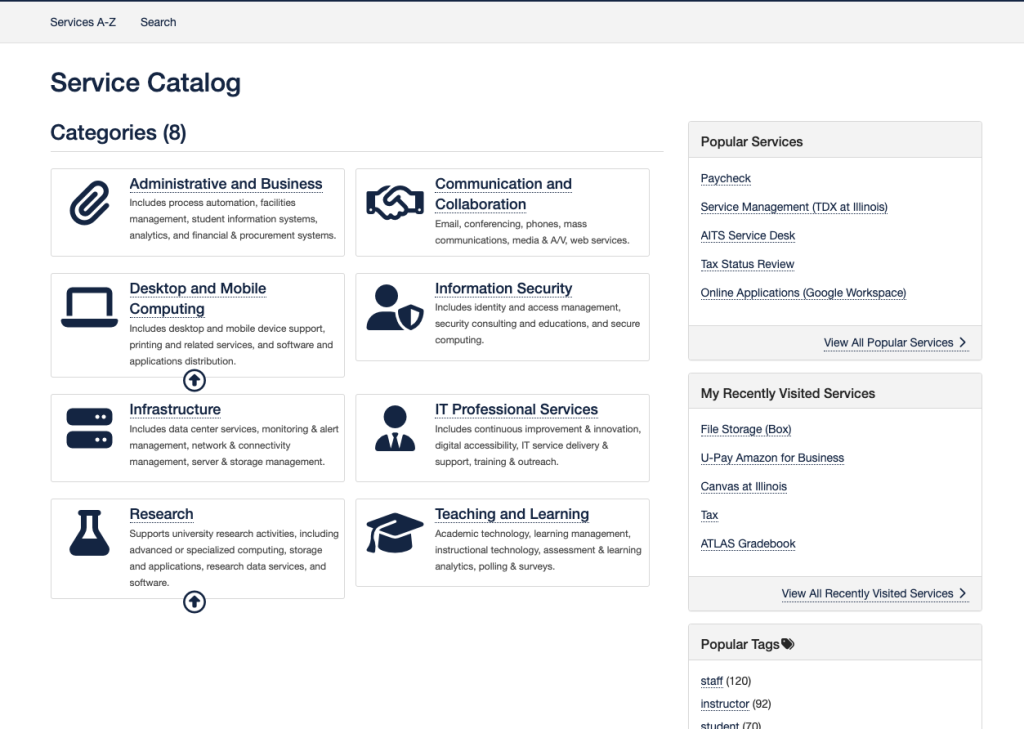
The IT Enterprise Service Management Office at the University of Illinois Urbana-Champaign recently launched the Enterprise IT Service Catalog, a centralized resource focused on helping students, faculty and staff discover, request and obtain support for IT services all across campus. This initiative represents a significant advancement in the way that technology resources are organized and distributed, improving collaboration across IT teams, improving operational transparency and increasing the university community’s access to IT services. Access the catalog on the Illinois Help Center website.

The service catalog is an online repository which consolidates information about the various IT services available at the U of I. Examples of resources listed in the catalog include email, desktop and mobile device support (including printing and related services), identity and access management for help with passwords, A/V services, cloud storage such as Box, Google Drive and One Drive, research software and more. Users can browse the offerings, submit service requests and locate answers to commonly asked questions through an easy–to–navigate platform. The current release focuses on enterprise level IT services that are broadly accessible across the university. 

This project is not simply a redesign of an existing catalog; it’s a new catalog that creates a more transparent method of communicating about IT services, eliminating the need for users to determine which unit they need to contact for assistance. This benefits the Illinois community by providing streamlined access to IT resources, improving organization through standardized service categories and also providing an enhanced user experience with a simplified interface and search functionality.  

Future phases will expand the catalog to include unit-specific IT services and non-IT offerings, such as HR and finance, with the goal of creating a comprehensive universitywide catalog. This will further enhance support for the diverse needs of the Illinois community. Explore the catalog today to take full advantage of the many resources that are available.  

Technology Services
1211 Digital Computer Lab
1304 W. Springfield Ave.
Urbana, IL 61801
Email: consult@illinois.edu
Office of the Chief Information Officer